1. Artificial urgency
The message says the data is at “immediate risk” and gives a deadline to create panic.
This is a real suspicious message with identifying information removed. It imitates a cloud-storage notice and tries to make the recipient act before checking whether the claim is genuine.
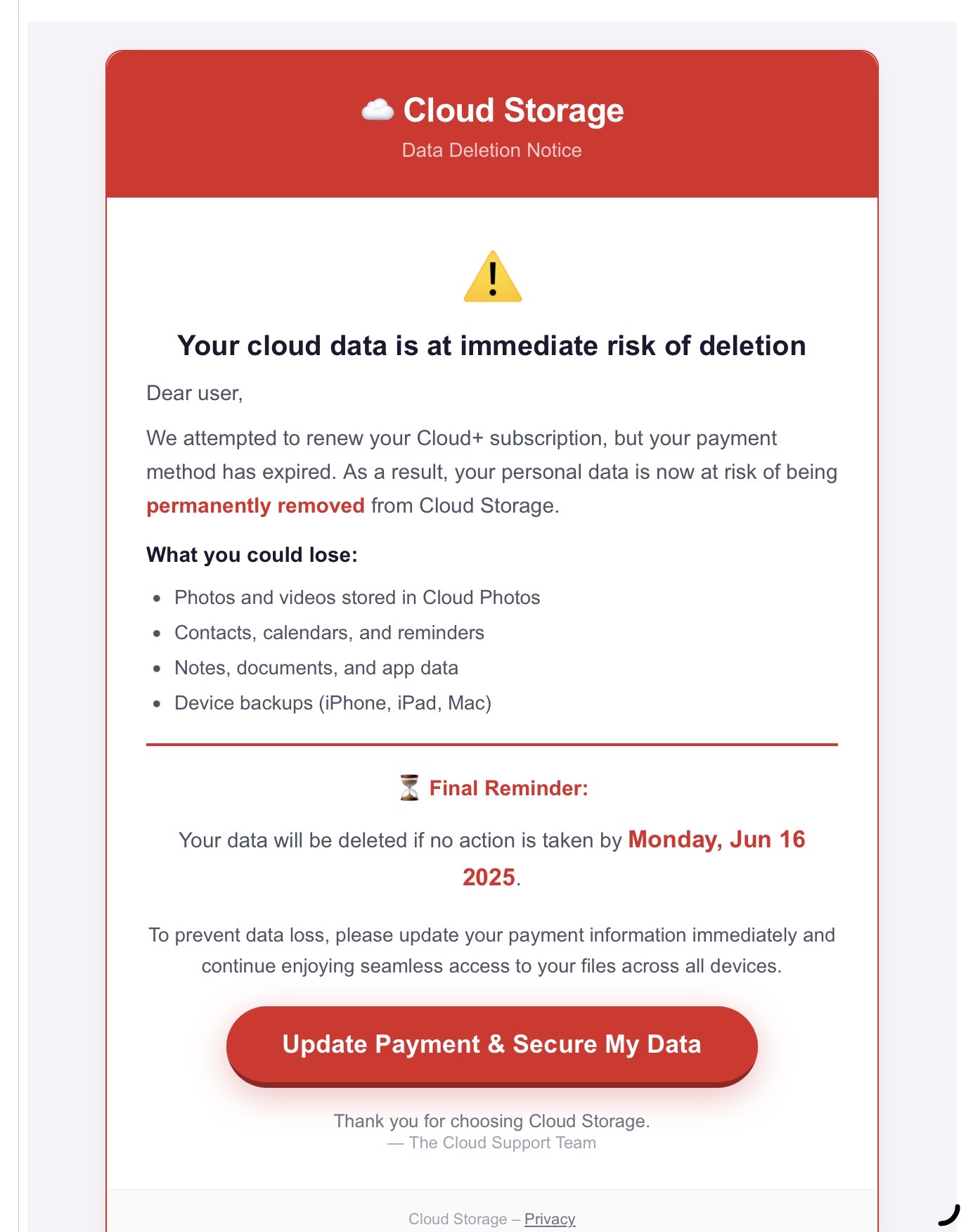
The message says the data is at “immediate risk” and gives a deadline to create panic.
“Cloud Storage” and “Cloud Support Team” do not identify a specific, verifiable provider.
“Dear user” is used instead of an account holder’s name or other account-specific information.
Photos, contacts, notes, and backups are listed to amplify the perceived consequences.
The prominent button directs attention toward entering payment details rather than independently verifying the account.
The message refers to Monday, June 16, 2025, even though it was viewed much later. Stale dates are a strong warning sign.
Assessment: Very high phishing risk.
Do not click the link, reply, call a number in the message, or enter payment information. Delete or report the message as phishing.